








By Diane O’Brien, Chief Marketing Officer at Digital Marketing All
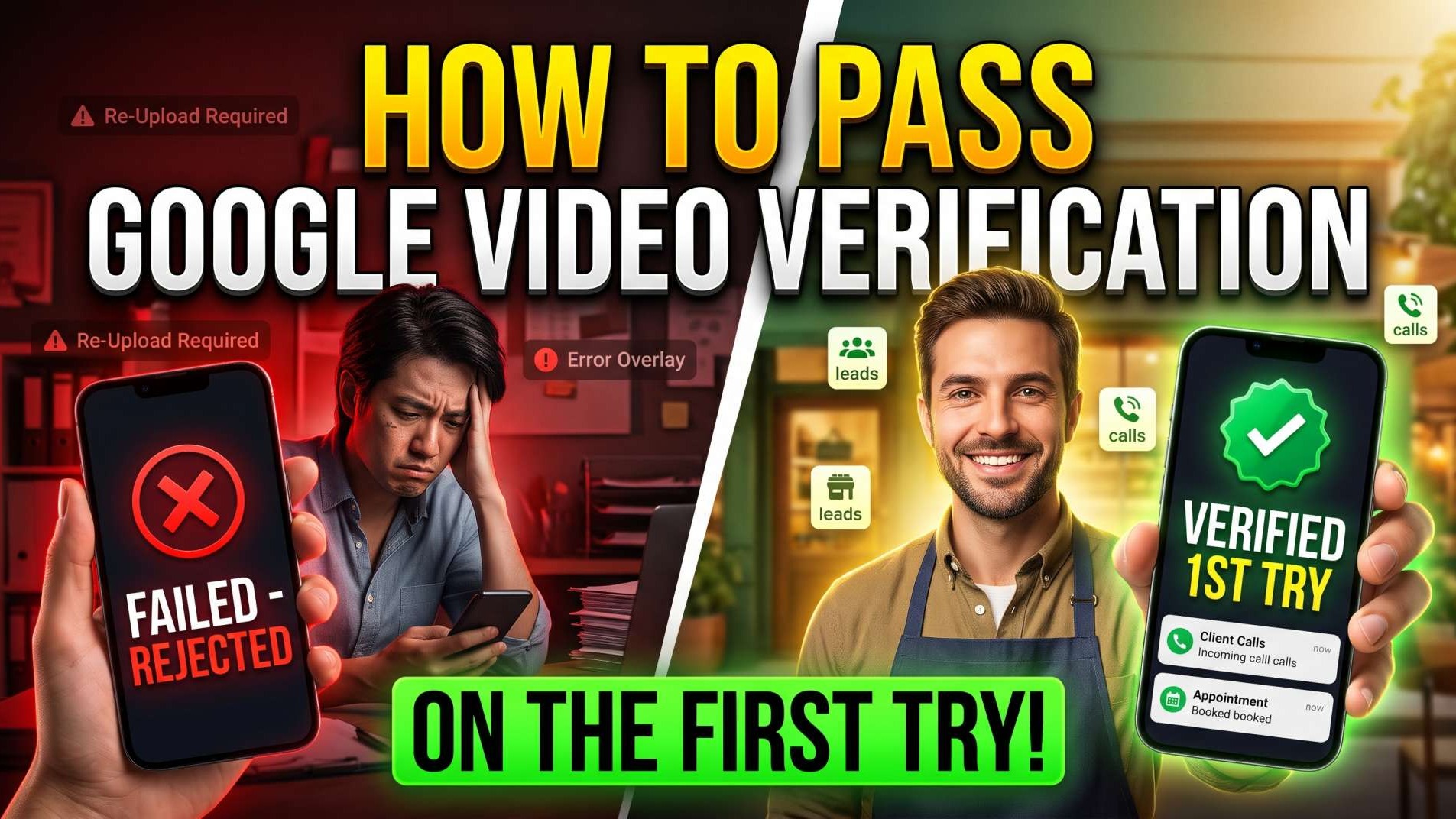
Waiting weeks for a tiny paper postcard with a five-digit code in your mailbox is officially a relic of the past. Google now requires you to pick up your smartphone, hit record, and capture an uncut mobile video proving your company is real. Thousands of honest business owners open the Google Maps app, walk around their office with their camera on, submit the recording, and wake up to a cold rejection email. Then their listing gets stuck in verification purgatory for weeks while local competitors down the street take every paying customer. Passing this review requires planning your route like an auditor before you ever hit record.
Key Takeaways
Continuous Uncut Recording: Google rejects any video that contains cuts, splices, edits, or offline file uploads; you must record live inside your mobile browser or Google Maps.
The Three-Pillar Rule: You must prove exact physical location, active commercial operations, and managerial control in a single 60-to-120-second take.
Proof of Management Counts: Filming your sign is not enough; you must use physical keys to unlock doors or vehicles, or log into operational software on camera.
Zero Face and Privacy Policy: Showing customer faces, license plates, bank numbers, or confidential documents triggers immediate algorithm rejection.
Understanding the Fundamentals of Google Video Verification
Search engines created video verification to wipe out fake listings, virtual office addresses, and lead brokers renting fake commercial addresses. The system relies on machine vision models and human security reviewers to evaluate the authenticity of your physical business footprint.
To pass this review, you need to understand the concept of the Source of Truth. In the world of business intelligence and marketing systems, your Source of Truth is the single, undisputed record that proves your business exists where you say it exists. When your name, street address, operating license, and physical workspace tell the exact same story across public records, Google's algorithms grant you instant trust.
When you start your video recording inside your mobile device, Google tracks your GPS location, checks camera motion, and inspects visual markers. If you fail to prepare your route in advance, you will run out of time or miss critical proof points.
Key Concept 1: The Three Core Verification Pillars
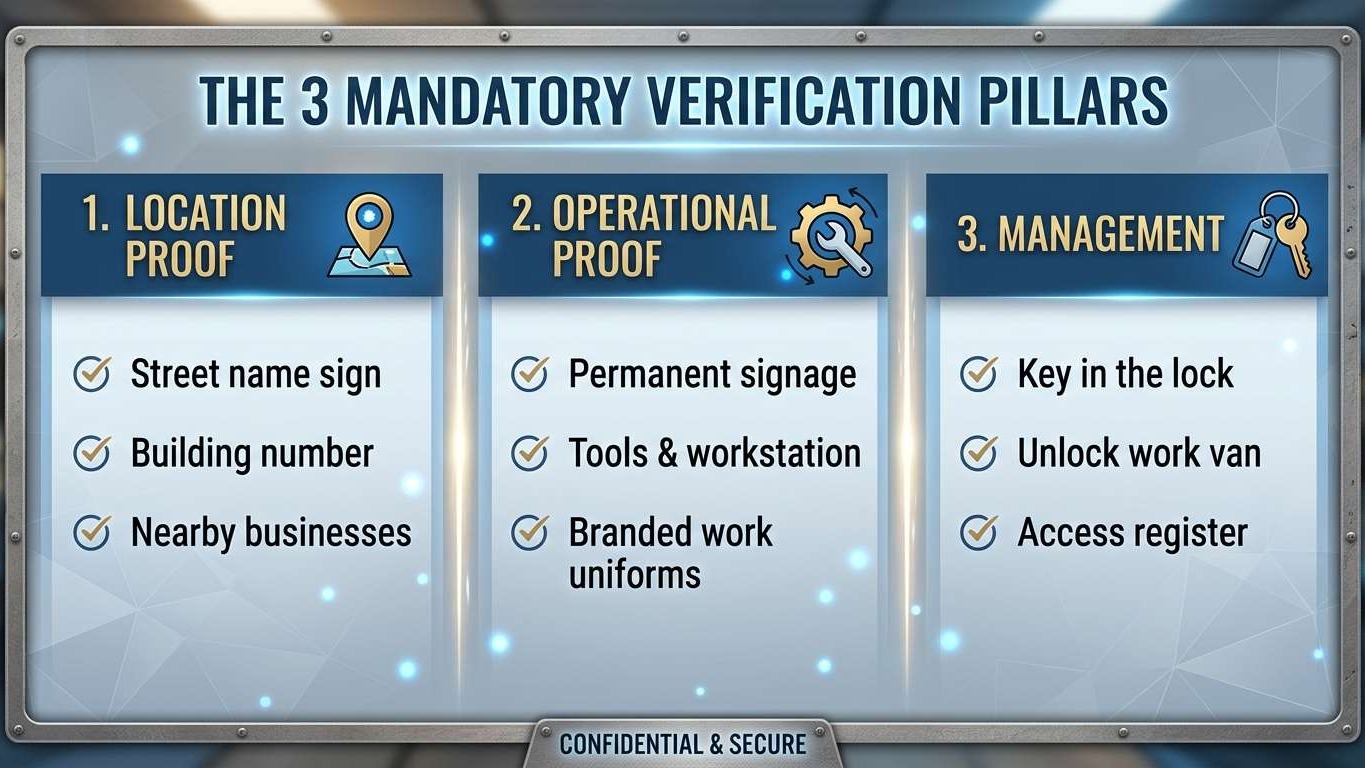
Every video you submit must provide undeniable evidence for three distinct categories:
Business Location: You must prove your business is located at the claimed address. Start outside and show the street name sign, the building exterior, the physical street number on the curb or doorframe, and neighboring businesses.
Business Operations: You must show that real commercial trade happens at this location. Show permanent physical signage with your exact business name, your active workspace, commercial equipment, and specialized trade inventory.
Proof of Management: You must demonstrate that you have authorized control over the business assets. A stranger can stand outside your building and take a video of your sign; only the actual business owner or manager has the keys to unlock the front door, access the private staff office, open a cash register, or log into the point-of-sale system.
Key Concept 2: The Two Business Types (Storefront vs. Service-Area)
Google separates local businesses into two main classifications. Your recording blueprint depends on how you serve your customers:
Storefront and Hybrid Businesses: These businesses welcome walk-in clients. You must show fixed, permanent signage on the exterior of the building, window lettering, or an official building directory plaque in the lobby. Temporary vinyl banners and printed paper taped to glass will be rejected immediately.
Service-Area Businesses (SABs): If you operate a trade service like plumbing, electrical work, or mobile detailing from a residential home office, your address is hidden from the public. You must start outside by filming your street sign and house number, then record your marked commercial service vehicle, specialized tools in your storage area, and yourself unlocking the vehicle or office with a key.
Implementation Consideration for Small Businesses
Small businesses often fail verification because they move too quickly or let their camera shake. Walk slowly, hold your mobile phone steady with both hands, and ensure exterior lighting is bright. Avoid filming at dusk or at night. Reviewers must be able to read your business paperwork and street signs without pausing the video.
How Two Massachusetts Businesses Overcame the Verification Hurdle
Let us look at two real local business owners who ran into Google's strict verification wall and solved it with a data-first approach.
Mark owns a residential electrical contracting company in Quincy, Massachusetts. When Mark tried to update his business profile address after moving into a larger dispatch yard, Google suspended his profile and demanded an uncut video recording. Mark walked into his backyard, filmed his laptop on a picnic table, showed a printed business card, and submitted a 30-second clip. Google rejected the video within 24 hours. His profile vanished from Google Maps. His inbound call volume dropped by 80 percent overnight, costing his company thousands of dollars every week.
Mark partnered with Digital Marketing All. Our AI-driven local SEO specialist audited his operational assets. We mapped out an exact walking route before touching the camera. Mark started the mobile recording at the corner intersection showing the municipal street sign on Adams Street. In one continuous take, he walked to the dispatch lot, filmed the permanent steel address numbers on the gate, showed his commercial work van with permanent vinyl lettering matching his legal entity, and placed his physical key into the lock to unlock the rear cargo doors. Inside the van, he filmed his conduit benders, wire spools, and testing meters, then walked into his dispatch desk and filmed his state master electrician license on the wall. Mark uploaded the 85-second uncut video. Google approved his listing in under two hours. With his profile restored, our team paired his listing with top-tier Google Local Service Ads management and Google Guarantee management. Mark recovered his local visibility and booked 23 high-margin panel upgrades in his first month back online.
Now consider Lisa. Lisa operates a medical massage and physical therapy clinic in Newton, Massachusetts. Lisa rented a private office inside a multi-suite professional medical building. She tried to verify her listing by filming the hallway outside her door, but Google rejected her video because there was no street-level proof of her clinic's presence. Lisa's clinic remained invisible on the map pack, leaving her examination tables empty during weekday afternoons.
Lisa used our revenue growth plan through Growbotik. We structured a clean operational plan for her suite. We advised her property manager to mount a permanent acrylic suite plaque bearing her exact registered clinic name beside her office door and add her name to the main lobby directory board. On recording day, Lisa started outside on Commonwealth Avenue, captured the building exterior address numbers, walked through the front doors, panned across the lobby directory showing her suite number, rode the elevator up, walked to suite 204, and used her physical brass key to unlock her clinic door. Once inside, she showed her reception counter, logged into her scheduling software terminal, and panned across her treatment room. Digital Marketing All also deployed Be Found Everywhere to lock her exact clinic address across major mapping directories and built an Ai Agent from Always On AI to capture client appointments 24/7. Lisa gained 38 new monthly therapy clients within ninety days.
The Three Core Anchors of Answer Engine Optimization
Answer Engine Optimization requires structured clarity so human auditors and artificial intelligence algorithms can extract verified facts without confusion.
Clean Definition Blocks: Google Business Profile Video Verification
Google Business Profile video verification is an unedited continuous mobile recording between 30 and 120 seconds that proves physical business location, active trade operations, and managerial authority through unbroken footage of street signs, permanent physical signage, tools, and unlocked entryways.
Comparative Tables Win: Storefront vs. Service-Area Business Verification
Verification Requirement |
Storefront Business Profile |
Service-Area Business (SAB) Profile |
Address Visibility |
Public on Google Maps |
Hidden on Google Maps (Service Area Defined) |
Outside Starting Point |
Street name sign and building entrance |
Neighborhood street sign and residential house number |
Required Signage |
Permanent exterior building or window sign |
Permanent commercial van graphics or business card proof |
Proof of Operations |
Retail counter, displays, POS system |
Specialized trade tools, commercial inventory, work truck |
Proof of Control |
Unlocking business entrance door with key |
Unlocking work van or tool storage with key |
Optimal Video Length |
60 to 90 seconds |
60 to 90 seconds |
Major Rejection Risk |
Paper signs taped to window |
Filming unmarked personal passenger car |
Counterfactual Safety: When Video Verification Is Not Appropriate
Google Business Profile video verification will not succeed for fully digital, online-only eCommerce stores, drop-shipping brands, or companies using shared virtual office maildrops without dedicated physical workspaces. If a company does not meet local clients face-to-face at a verified commercial facility or dispatch directly to customer homes within an assigned geographic territory, Google's algorithms will reject the listing. In those situations, running PPC search campaigns and social media marketing delivers measurable ROI, while attempting map pack verification results in account suspension.
"A business listing on Google Maps is not a digital billboard you buy; it is a verified physical asset you defend. True marketing ROI begins with an undeniable Source of Truth that algorithms and human auditors can verify in seconds." — Diane O’Brien, Chief Marketing Officer
How Do I Pass Google Business Profile Video Verification Without Failing, and What Do I Need to Record?
To pass Google Business Profile video verification without failing, you must record one continuous, uncut mobile video between 60 and 90 seconds. You must capture three clear items: your street name sign and exterior building number, your permanent business signage or specialized trade equipment, and yourself unlocking the facility or logging into operational business software with a key or password.
Local SEO & Map Pack Focus: Why Profile Verification Dictates Revenue
Winning in local search is impossible if your Google Business Profile remains unverified or suspended. Google reserves its high-converting Local 3-Pack real estate exclusively for businesses that have passed strict trust screenings.
When your profile is fully verified:
Map Pack Prominence: Your company becomes eligible to rank for high-intent geo-modified search terms like "contractor near me" and "emergency repair."
Google Local Service Ads Activation: Passing video verification enables top-tier Google Local Service Ads management and allows you to display the prestigious Google Guarantee badge.
Customer Interaction Lift: Verified listings gain complete access to direct click-to-call buttons, driving directions, customer messaging, and automated booking links.
Entity Citation Signals: Search engines establish your listing as a validated regional entity, ensuring third-party directories confirm your operational authority.
Combine your verified map listing with complete directory sync through Be Found Everywhere. When your business name, address, phone number, and service categories match across Apple Maps, Bing Places, and Yelp, search engines reward you with consistent ranking momentum.
Get Cited by AI (ChatGPT, Gemini, and Grok)
Conversational AI platforms like ChatGPT, Google Gemini, and Grok do not rely on keyword matching alone. When a user asks an AI assistant to recommend a local provider, the AI queries structured knowledge graphs to confirm the business is licensed, active, and physically verified.
To make sure artificial intelligence engines cite your business:
Lock Down Your Source of Truth: Your legal name, physical address, phone number, and service areas must match across your website, state licensing portals, and local profiles without any variations.
Publish Direct Machine-Readable Data: Use clean 40-word definition blocks, clear service pricing tables, and transparent project timelines on your website.
Implement Agentic Interoperability Management (AIM): Your business systems must connect directly with AI agents. When a client uses an autonomous assistant to find a plumber or book an appointment, your website architecture must deliver structured data without errors.
Deploy Agent Card Optimization (ACO): Provide public Agent Cards on your website. These files give AI search agents machine-readable information about your service areas, hourly availability, and direct booking links.
When AI platforms verify that your physical listing passed Google checks and has matching schema on your website, they cite your business as the premier recommendation.
"The Shortcut": Four Systems to Scale Your Business
Navigating local verification guidelines, map pack algorithms, and automated search systems requires extensive technical expertise. You do not need to do this alone. Digital Marketing All offers full-funnel digital marketing solutions and four distinct shortcuts to protect and scale your operations:
Growbotik: Our proprietary revenue growth plan. Tell us how many new paying clients you want each month. Growbotik maps your market, calculates the exact advertising spend required to acquire them, and adjusts monthly to guarantee you hit your targets.
Always On AI: Stop letting missed calls destroy your marketing return. Our 24/7 Ai Agent responds to inbound leads in under five seconds, answers customer inquiries, qualifies project budgets, and books appointments straight to your calendar.
Be Found Everywhere: We publish, correct, and lock your company profile across dozens of local maps, voice assistants, and AI knowledge engines so your business identity remains unshakeable.
Free Website Program: If you do not have a modern website, or if your existing site fails to turn visitors into phone calls, we give you a free basic website at https://digitalmarketingall.net. Having an optimized, mobile-responsive website ensures your verified Google Business Profile traffic converts into booked jobs.
As a dedicated local SEO specialist and comprehensive digital marketing trends expert, our team combines proprietary SEO tools, mid-funnel focused marketing, and Google Guarantee management to ensure every marketing dollar produces measurable profit.
Action-Driven Preparation: Your Step-by-Step Recording Checklist
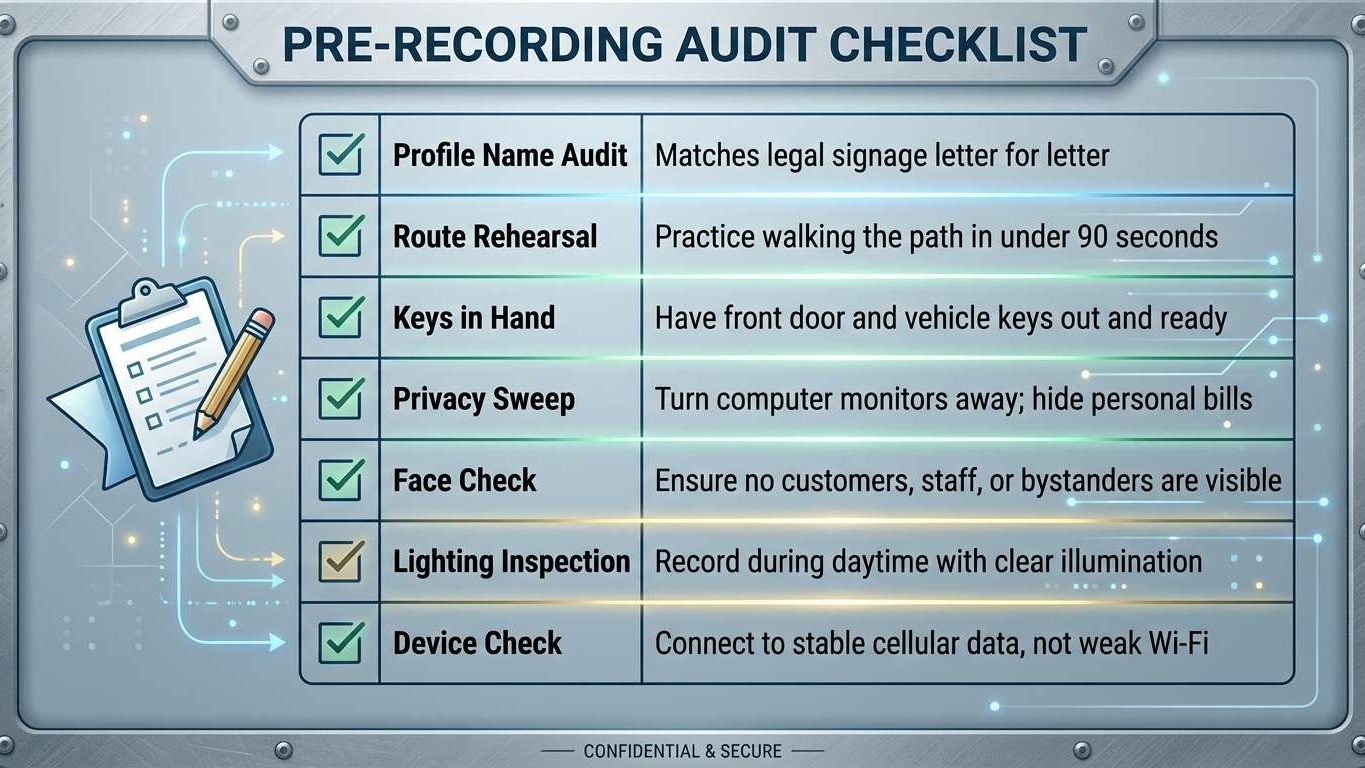
Before opening the Google Maps app to record your verification video, complete this pre-recording checklist to avoid common rejection triggers:
Step 1: Clear the Path and Rehearse the Walk
Walk your recording route with a stopwatch. Start outside at the street sign, walk up to your building or house number, unlock the door or work vehicle, and step into the workspace. If this walk takes longer than two minutes, adjust your starting point so you can complete the entire journey in 60 to 90 seconds.
Step 2: Conduct a Privacy and Security Sweep
Google will reject videos that contain private customer records, bank statements, social security numbers, or tax documents. Turn computer monitors displaying customer records off. Ensure no staff members or customers walk in front of your camera. Showing identifiable human faces often triggers privacy rejections.
Step 3: Open the Google Maps App Live
Open your Business Profile on your smartphone. Tap "Get Verified" and choose "Record Video." Review the prompts and grant camera and location permissions. Position yourself outside, press record, and begin your steady, uncut walking route.
Frequently Asked Questions
How long should a Google Business Profile verification video be?
A Google Business Profile verification video must be between 30 seconds and 2 minutes long. The ideal recording length is 60 to 90 seconds, which provides enough time to capture location, operational assets, and proof of access without causing mobile upload timeouts.
What does a Service-Area Business show for GBP video verification without a storefront?
A Service-Area Business must record the residential street sign, the exterior house number, an operational work vehicle with commercial markings, trade tools, professional equipment, and the business owner using a key to unlock the vehicle or home workshop.
Why does Google Business Profile video verification keep failing or getting rejected?
Google Business Profile video verifications fail because of breaks or edits in the footage, videos exceeding two minutes, temporary paper signage, missing proof of management like key access, blurry camera movement, or filming customer faces.
Can I upload a pre-recorded video for Google Business Profile verification?
No. Google requires the verification video to be captured live inside the Google Maps mobile interface or verification portal. You cannot record footage on a standard camera app, edit the clip, and upload it later.
How long does it take for Google to review a video verification recording?
Google reviews video verification submissions within one to five business days. Once the automated review and manual audit are complete, the Business Profile dashboard will display a verified badge or provide specific instructions to record a new video.
How does a verified Google Business Profile help a business get cited by AI engines like ChatGPT and Gemini?
Conversational AI engines pull data from verified Google Maps listings and structured directories to confirm operational existence. A verified profile provides the foundational trust signal needed for AI models to recommend a local business in conversational search answers.
What should I do if my Google Business Profile video verification fails twice?
If your video verification fails twice, do not keep submitting identical footage. Contact Google Business Profile support through your dashboard help menu and request a live video call verification with a Google support specialist.
How to Secure Your Google Business Profile and Scale Local Revenue
Passing Google Business Profile video verification is the critical first hurdle to dominating local search. Once your business is verified, the real work begins: maintaining consistent photo uploads, collecting verified reviews, locking your directory citations, and deploying automated systems to turn inbound interest into revenue. Stop letting confusing technical verification rules delay your company's growth. Partner with Digital Marketing All to put verified local search dominance, high-intent advertising, and automated lead capture to work for your business.
I hope you enjoy reading this blog post. If you want to be our next success story, have my team do your marketing. Click here to book a call! Tell us how many new clients you want a month. We will create a free revenue growth plan to achieve those new clients. Click to get your revenue growth plan.
Recommended Reading
Do you use GHL? If so, check this out: https://dmkgall.com.


Write A Comment